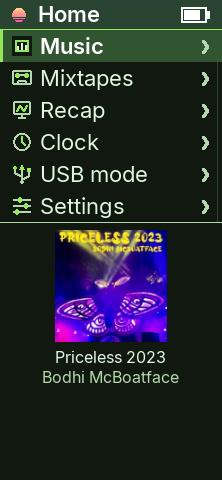
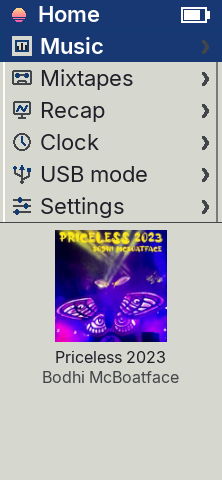
GNARLYR.
English

Theme packs · format version 2

Theme packs for Gnarlyr

A .gtheme pack changes colors, backgrounds, and icons. Build or preview a pack offline, then copy it to your ECHO over USB. Select a screenshot to see it at full size.

Step 1 of 5

Make a theme folder

Every theme pack is compiled from one ordinary folder on your computer containing a manifest (theme.json or theme.toml) and optional PNG images.

The fastest way to begin is to copy examples/themes/pocket-scope ↗ or examples/themes/desktop-98 ↗, generate a fresh UUID for id, and customize the colors and PNGs.

my-theme/
├── theme.json                 # or theme.toml
├── home-landscape.png         # 480×222 opaque PNG (optional)
├── home-portrait.png          # 222×480 opaque PNG (optional)
├── now-playing-landscape.png  # 480×222 opaque PNG, indexed codec (optional)
├── list-tile.png              # 1–64 px repeating tile, opaque PNG (optional)
└── music-icon.png             # 20×20 PNG with optional transparency (optional)

Starter theme.json

{
  "id": "generate-your-own-uuid-v4-here",
  "name": "Midnight Tape",
  "author": "Your name",
  "version": "1.0.0",
  "licence": "CC0-1.0",
  "homepage": "",
  "gallery": "",
  "base": "graphite",
  "horizon": false,
  "header_rule": true,
  "codec": "indexed",
  "dither": "none",
  "palette": {
    "background": "#12151f",
    "text": "#eef1f8",
    "text_secondary": "#a9b3c9",
    "text_tertiary": "#8792ab",
    "selection_background": "#283454",
    "selection_top": "#4c67a8",
    "selection_shine": "#7fa2f5",
    "selection_text": "#ffffff",
    "header_background": "#1d253b",
    "header_top": "#4c67a8",
    "header_text": "#ffffff",
    "divider": "#343e59",
    "scrollbar_thumb": "#7fa2f5",
    "danger": "#f27a74",
    "success": "#8ae6a4",
    "chevron": "#a9b3c9",
    "accent": "#7fa2f5",
    "accent_alt": "#f5b87f",
    "backdrop_top": "#12151f",
    "backdrop_bottom": "#192033"
  },
  "assets": [
    { "slot": "home", "file": "home-landscape.png", "orientation": "landscape" },
    { "slot": "now_playing", "file": "now-playing-landscape.png", "orientation": "landscape", "codec": "indexed" },
    { "slot": "list", "file": "list-tile.png", "orientation": "any" },
    { "slot": "icon_music", "file": "music-icon.png", "orientation": "any" }
  ]
}

You can omit assets (or leave it empty) for a pure palette-only theme. Generate a unique UUID v4 with uuidgen on macOS/Linux or python3 -c "import uuid; print(uuid.uuid4())", and keep that same id whenever you publish newer versions of the same theme.

Required and optional manifest fields
FieldDetails
idNon-zero UUID identifying your theme across updates.
name, authorUTF-8 strings, up to 31 bytes each. Shown in Settings → Display & text → Theme.
versionNumeric major.minor.patch (each 0–65535, no leading zeros).
licenceLicense identifier such as CC0-1.0, MIT, or CC-BY-4.0 (up to 63 UTF-8 bytes).
homepage, galleryOptional https:// URLs (up to 127 bytes each), or empty string "".
baseBuilt-in fallback theme: graphite, neon, sunset, glass, or classic.
horizon, header_ruleBooleans controlling the wireframe horizon backdrop and the 1 px line beneath the top status bar.
codec, ditherDefault image codec (indexed or lossless) and palette dithering (none or floyd). Individual assets can override both.

Step 2 of 5

Choose the 20 palette colors

Every pack supplies all 20 color roles as #RRGGBB hex strings. The builder converts them to the ECHO’s 16-bit RGB565 display format.

Palette roles in theme.json / theme.toml
RoleWhere it appears
backgroundMain screen surface behind lists, Home, and Now Playing.
text, text_secondary, text_tertiaryPrimary labels, artist/album lines, and muted timestamps or hints.
header_background, header_top, header_textTop status bar fill, top edge highlight, and screen title/icons.
selection_background, selection_top, selection_shine, selection_textHighlighted menu row fill, top bevel/edge, shine accent, and active row label.
divider, scrollbar_thumb, chevronHairline separators, right-hand scroll indicator, and list arrows.
accent, accent_altProgress bars, active controls, VU/spectrum highlights, and secondary flourishes.
success, dangerConfirmations/charging indicators and low-battery or destructive warnings.
backdrop_top, backdrop_bottomVertical gradient stops used behind screens that draw a gradient backdrop.

Automatic readability check: The builder checks contrast for primary text, secondary text, selected rows, and header text against their backgrounds. Pairs below 4.5:1 trigger a low-contrast warning in Companion and on the player, though the pack still builds and runs.

Step 3 of 5

Create artwork and icons

Add PNGs for any screen or icon you want to customize. Any slot you leave out uses Gnarlyr’s built-in drawing with your theme’s palette.

Image slots, dimensions, and codec rules
SlotDimensionsAlpha & codec
home 480×222 (landscape)
222×480 (portrait)
Opaque only. indexed or lossless.
now_playing 480×222 (landscape)
222×480 (portrait)
Opaque only. indexed required—lossless is refused because Now Playing redraws during playback.
list Full screen (480×222 / 222×480) or repeating tile (1–64 × 1–64) Opaque only. indexed or lossless. Tiles work across any orientation ("orientation": "any").
splash 480×222 (landscape)
222×480 (portrait)
Opaque only. indexed or lossless.
icon_<name> 20×20 (large menu icons)
14×14 (small status icons)
9×14 (narrow status icons)
Transparency supported (quantized to 4-bit alpha). indexed or lossless. Optional text_size (small, medium, large, any).
cassette_label 160×48 Reserved in format v2; accepted by the builder, not yet drawn by the player.
  • Choose indexed by default. Indexed assets hold up to 256 colors, compress tightly, decode fast, and are required for now_playing. Set "dither": "floyd" on photographic or smooth-gradient PNGs if you want Floyd–Steinberg dithering, or keep "none" for crisp pixel art.
  • Use lossless only when exact RGB565 pixels matter. Lossless assets skip palette quantization on home, list, splash, and icons, at the cost of larger files.
  • Keep backgrounds calm behind text. The ECHO renders menus, track titles, and album art on top of your backgrounds. Low-contrast textures and subtle border frames keep text sharp on the 2.39-inch display.
  • Respect pack budgets. Each .gtheme file can hold up to 64 assets and up to 2 MiB total.
All 60 icon slot names and sizes

Large menu icons (20×20):

icon_music icon_audiobook icon_podcast icon_now_playing icon_mixtape icon_audio icon_settings icon_cover_flow icon_artist icon_album_artist icon_album icon_genre icon_folder icon_song icon_playlist icon_favorite icon_shuffle icon_repeat icon_display icon_theme icon_power icon_sleep icon_timeout icon_controls icon_start icon_rescan icon_diagnostics icon_gain icon_jack icon_usb icon_bluetooth icon_key_plus icon_key_minus icon_key_play icon_key_menu icon_disc icon_hub icon_search icon_computer icon_info icon_tag icon_hide icon_delete icon_globe

Small status icons (14×14):

icon_play icon_pause icon_next icon_previous icon_playing icon_queue icon_speaker icon_album_small icon_shuffle_small icon_logo

Narrow status icons (9×14):

icon_bolt icon_bluetooth_small icon_lock icon_song_small icon_plug icon_chevron

Step 4 of 5

Build and preview the pack

You can compile and inspect version 2 .gtheme packs right inside Gnarlyr Companion—no command line required—or from a firmware source checkout.

Option A · Gnarlyr Companion (desktop)

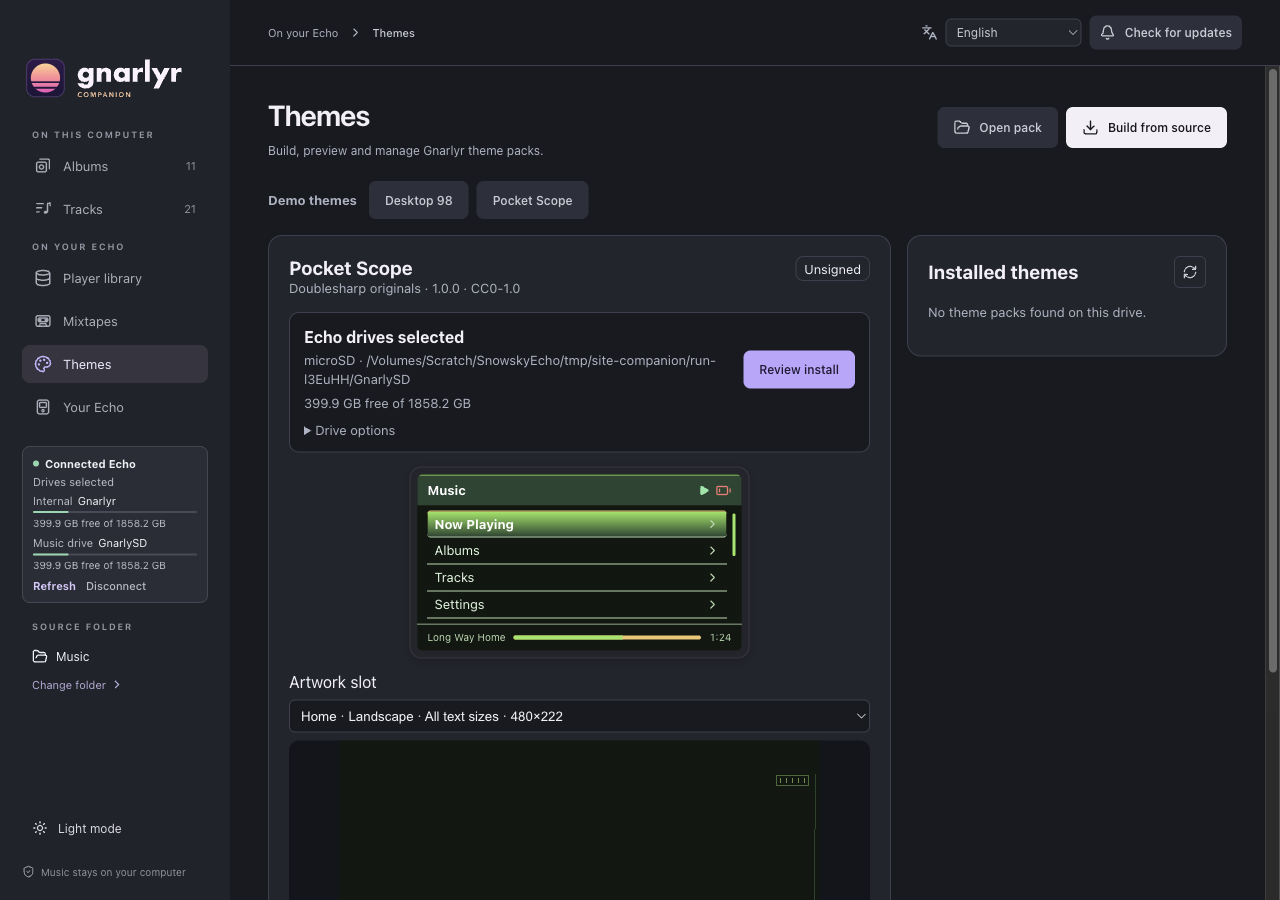
Gnarlyr Companion previewing Pocket Scope with an Echo screen preview and artwork slots
Gnarlyr Companion previewing Pocket Scope offline · select image to enlarge
  1. Build from source. Open Themes → Build from source, choose your theme folder, and pick where to save the .gtheme pack.
  2. Inspect offline. Companion validates format v2 rules, flags low-contrast palette pairs or Now Playing codec errors, renders a live Echo screen preview, and lets you inspect every compiled RGB565 artwork slot and palette swatch.
  3. Install directly. Connect your ECHO in USB storage mode, choose Find my Echo → Review install → Install pack, then choose Eject Echo.

Option B · Command line (from source)

From the root of a Gnarlyr source checkout ↗ with Pillow installed, run theme_pack.py to compile, check, and export decoded RGB565 preview PNGs:

Build, check, and export previews

python3 firmware/tools/theme_pack.py my-theme --output /Volumes/Scratch/SnowskyEcho/themes/my-theme.gtheme --preview /Volumes/Scratch/SnowskyEcho/themes/previewpython3 firmware/tools/theme_pack.py --check /Volumes/Scratch/SnowskyEcho/themes/my-theme.gtheme

Passing a directory to --output writes the canonical UUID filename automatically. The command prints JSON showing every asset’s codec, encoded size, compression ratio, PSNR quality, and any warnings.

Step 5 of 5

Install the pack on your ECHO

You can install any .gtheme pack over ordinary USB storage—even without Companion.

  1. Connect in USB storage mode. Plug in your ECHO and choose Connect to computer (or Home → USB mode → Connect to computer).
  2. Open the active music drive. Use the microSD card if one is inserted; otherwise use internal storage.
  3. Copy the pack. Put your .gtheme file inside /.gnarlyr/themes/ (create the folder if needed). Use a clean filename ending in lowercase .gtheme (at most 63 UTF-8 bytes, not starting with a dot).
  4. Safely eject every player drive. On the player, open Settings → Display & text → Theme. Highlight your pack to preview it live, then press Play to save it.

Good to know before sharing a theme

  • Updates use UUID + version. Keep the same id and bump version (for example, 1.0.0 → 1.1.0). When multiple files share a UUID, the player picks the highest numeric version.
  • Player folder limits. Gnarlyr examines the first 128 entries in /.gnarlyr/themes/ and lists up to 12 packs.
  • Unsigned packs work normally. You do not need a signing key to make or share themes. Optional Ed25519ph signing is documented in docs/theme-format.md in the source checkout.
  • Format version 2 required. Current firmware reads version 2 packs only; rebuild any older version 1 pack from its source folder.